Author Archives: bitbull-uk

I have been programming games since I was about ten years old. I had my first titles, Subterranean Nightmare and (the frankly pretty terrible) Skateboard Joust, published on the ZX Spectrum when I was 15.
For the past 15 years I have been making a living developing games for mobile (feature) phones via my companies BitBull and Maturus Mobile. My games are served on all the major International operator portals, have regularly featured in the ELSPA charts and have won several Pocket-Gamer awards. In 2013 my original puzzle game ‘Puzzled Zombies’ was nominated for Pocket Gamer’s ‘Game Of The Year’ alongside entries from big players such as Namco and Electronic Arts.

Being an independent games developer is not easy. I’ve been doing this a long time yet am still tearing my hair out and learning new things pretty much every day. I still know nothing.

Get in touch via the BitBull website at http://www.bitbull.com.

Windows Phone Development On A Mac With MonoGame

This week I have been porting ‘Toss The Floppy Frog’ (my first Android and iOS title with MonoGame) to Windows Phone 8 – and it has been painful. Very painful. So painful that I though I’d write a simple step-by-step guide to the process of porting iOS and Android MonoGame titles to Windows Phone. Hopefully this will ease the pain for others.

Part of the suffering has, no doubt, been due to the fact that I am a complete Windows noob. I have been developing on a Mac since around 1995 and have barely touched a Windows machine since then – I even wrote my own JavaME emulator (running on J2SE) so I could do JavaME development on a Mac! Windows, and all its terminologies and conventions, is very much uncharted territory for me.

The largest chunk of pain has, though, been due to what are in my opinion three key deficiencies in the Windows Phone implementation of MonoGame. These are…

1. The Project Templates Are Broken
The MonoGame project templates provided with the 3.2 install don’t work with Visual Studio 2013 (which is the latest version at the time of writing). I don’t know about previous versions. The basic template doesn’t launch the game correctly and doesn’t get to the ‘cornflower blue’ screen we so long for. No errors are given, it just doesn’t work. This issue caused me around half a day of tearing hair out before I found a post on the MonoGame forum that gave a solution (see the ‘step by step’ guide below). If these templates could be fixed I’m sure it would save a lot of developers a lot of grief and avoid casting MonoGame in an unnecessarily bad light.

2. The Content Pipeline Requirement Sucks
I understand the requirement for a content pipeline, really I do. Optimising your assets for use on different platforms is a great idea, but it should be exactly that – part of the optimisation process, NOT a requirement for getting a basic game up and running. The fact that ‘raw’ image and sound assets can’t be loaded in the Windows Phone implementation of MonoGame but can in the Android and iOS versions kind of makes a mockery of the whole ‘Write once, play anywhere’ mantra. Many developers (myself included) will have games that run perfectly fine without the need for content pipeline optimisations and the requirement to use one is just an unnecessary barrier to ‘getting stuff done’.

3. The Content Pipeline Itself Sucks
I couldn’t get any of the MonoGame content projects to load correctly in Visual Studio 2013 and I was unable to find any information online as to how to get the Monogame content tools to work correctly without these. the MonoGame content tools were completely useless to me. Fortunately someone on the MonoGame forums pointed me to an open-source XNB compiler that I was able to edit (ie hack) to convert all my assets to XNB (see the ‘step by step’ guide). That’s at least a day of pain right there. Frankly, if I hadn’t have been pointed to this tool I probably would have given up (and I hardly ever give up).

Now I have the greatest respect for the MonoGame project and team – they have given and continue to give their time for free to provide an awesome product for the IndieDev community. The criticisms above are given in the hope that these areas of MonoGame will be improved which will lead to more developers adopting the platform and more fun/revenue for all of us. Hopefully they’ll be taken in that spirit.

And, once you’ve got past the pain, there is one gigantic plus to all of this, and that is…

100% code re-use!!

Yes, you read that right. Once I was able to iron out a couple of quirks I was able to get 100% resuse of my game code across Android, iOS and Windows Phone. That’s pretty much the holy grail of cross-platform coding and an extremely big upside! The only platform specific code is in the app-launcher stubs and about three lines in my image loader. Nice.

So, without further ado, on to the step by step guide to porting iOS/Android MonoGame titles to Windows Phone using a Mac…

1. Prepare Your Code For Windows Phone
If, like me, you’re more familiar with a Mac and Xamarin Studio than Windows/Visual Studio it’s easiest to get this out of the way before you even touch Windows. Here are the issues I came across:

System.Collections.Hashtable is not available on Windows Phone.

References to this class can be replaced easily by references to:

System.Collections.Generic.Dictionary<Object><Object>

Note that there is a slight ‘gotcha’ here in that Hashtable will return null when trying to retrieve a value for a key that doesn’t exist whereas Dictionary will throw an exception. Your code may need to be altered to account for this.

System.Collections.ArrayList is not available on Windows Phone.

References to this class can be replaced easily by references to:

System.Collections.Generic.List<Object>

System.Runtime.Remoting package is not available on Windows Phone.

If you use this package you will have to work around this somehow. I was using it for dynamic class instantiation and could quite easily replace it by hard-coded calls to instantiate the relevant classes.

The following MonoGame properties return incorrect values on Windows Phone:

GraphicsDeviceManager.PreferredBackBufferWidth
GraphicsDeviceManager.PreferredBackBufferHeight

GraphicsDevice.DisplayMode.Width
GraphicsDevice.DisplayMode.Hight

If you are using any of these to get display width/height the following alternative seems to work:

GraphicsDevice.Viewport.Bounds.Width
GraphicsDevice.Viewport.Bounds.Height

Texture2D.FromStream() is not implemented in MonoGame for Windows Phone.

Bummer. If you are using this (as I was) you will have to work around it. I caught the System.NotImplemented exception and loaded the relevant asset(s) using the content manager instead. I really hope this gets implemented soon as it’s an important function.

Assets are loaded without the file suffix.

On Android/iOS you will probably be using something this:

Content.Load(“myimage.png”)

to load assets which will have to change to:

Content.Load(“myimage”)

on Windows Phone. Ideally write code that catches the exception and tries the alternative method if the first attempt fails.

2. Install Some Kind Of Virtual Machine
You probably want either VMWare Fusion or Parallels. I used Fusion which seems OK though it took quite a bit of farting around to get the ‘shared folder’ feature (which allows you to access files on your ‘host’ mac from the ‘guest’ PC) to work.

3. Set Up The Virtual Machine And Install Windows
Set up an x64 virtual machine and install a 64bit version of Windows otherwise the Windows Phone emulators won’t work. I’m still running a 32bit version of Windows which means I have been unable to launch the emulators so far – I’ve been using an actual device for testing. I believe it must also be the ‘pro’ version of Windows in order for the emulators to work.

4. Install Visual Studio 2013 Twice(!)
From here. You want both the ‘Windows’ version (for Windows Phone) and the ‘Windows Desktop’ version (for the content pipeline stuff). Fortunately both will reside happily side-by-side (unlike my children).

5. Install MonoGame 3.2
From here. May well have been updated since this was written.

6. Install XNA
You will need this for the content pipeline stuff. Follow the instructions and use the PowerShell script kindly provided here.

7. Install Windows Media Player
If it’s not there already – some versions of Windows install it by default, some don’t. You’ll need it for audio processing in the content pipeline and it can be downloaded from here.

8. Set Up A New MonoGame Solution
Launch Visual Studio for Windows and choose the ‘MonoGame Windows Phone’ project template uncder ‘Visual C#’ templates. If it’s not there you need to check MonoGame has installed properly. Call the project something sensible (e.g. the name of your app) and save it anywhere.

9. Update The MonoGame Packages
This is necessary to fix the broken MonoGame template issue and must be done with a solution open in Visual Studio. Launch the NuGet console under Tools->NuGet Package Manager->Package Manager Console and type in the following:

PM: Install-Package MonoGame

This will update the template. It asks if you want to overwrite a few files – click ‘yes’ to each one but ‘no’ to ‘Game1.cs’ as this file will have been altered to reference your app’s namespace.

10. Check For ‘Cornflower Blue’
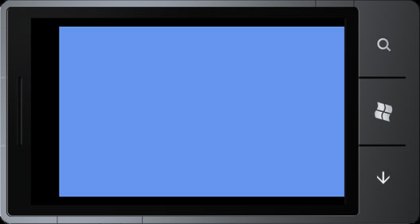
Now you have done this you should be able to build/run the project and get our old friend the ‘cornflower blue’ screen on your chosen emulator or device. Well done! It took me about a day to get to this point!

11. Import Your Source Code
Having wasted a lot of time trying to get Visual Studio to reference files on my Mac I came to the conclusion that this is impossible. Unlike Xamarin Studio, Visual Studio won’t let you import files as links – they have to reside within the project directory, so the simple-but-far-from-ideal solution is to copy the files from your Mac to the host PC and import. Note that you can ‘copy’ directories from within Windows Explorer and ‘paste’ into Visual Studio which I found the easiest way to import a lot of files at once.

12. Compile Your Source
Hopefully if you followed the suggestions in step one your source just compiles at this point. If not you will have to fix any errors, unfortunately I can’t tell you what these might be as I covered everything I came across in step 1!

13. Convert Your Content To XNB
This should be possible just by using the MonoGame tools but I never succeeded. I had to download an open-source XNB compiler tool from here, open in Visual Studio Desktop, then compile and run to convert my files. It works OK, but the tool only appears to allow you to add one file at a time. Thankfully it was fairly easy for me to modify the code to allow all files in a directory to be added and I’ve included my edited source here. The tool successfully converted PNG, JPG and WAV files for me. If you get an error regarding a missing .dll whilst trying to covert audio you probably need to install Windows Media Player as described in step 7. Whilst MP3 files seem to convert OK I haven’t managed to get them playing correctly yet but I will update this post if and when I do.

14. Import Your XNB Files Into Visual Studio
These go in the ‘Content’ directory exactly as you’d have them organised for iOS or Android. Once imported select the files and under ‘properties’ set ‘build action’ to ‘content’ and ‘copy to output directory’ to ‘copy always’.

15. Change The Template Code To Start Your Game
In Visual Studio find the GamePage.xaml file. Click the little disclosure triangle next to it to reveal GamePage.xaml.cs. Edit this file to replace references to the Game1 with references to your Game class.

16. Run Your App
Congratulations, assuming you followed the tips in stage 1 about loading assets your app should now run on device or emulator. It took me almost three days to get to this point!

I hope this guide is of help to someone – any suggestions for improvement just let me know!

Toss The Floppy Frog – Feels Like My Life’s Work

cornflower
Not Since Yves Klein Has A Blue Square Seemed This Exciting
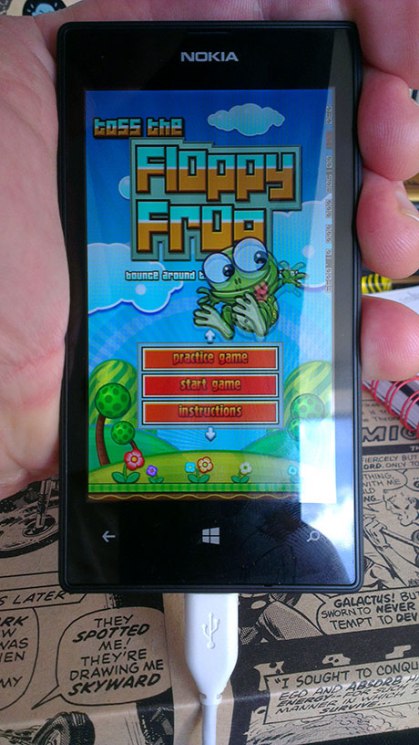
floppy
At Last – Frog Tossing On Windows

Retry – Why Both Apple And Rovio ‘Could Try Harder’.

Everyone knows how difficult it is for indie devs without a massive marketing budget to get visibility on the AppStore, which is why the minimal amount of curation Apple does is so important for indies – and why it’s doubly depressing to see the “Editor’s Choice” section of the AppStore so often filled with big-budget, big-name titles. Do consumers really need to have yet another ‘Saga’ or ‘Angry Birds’ game rammed down their throats when King/Rovio’s overflowing marketing coffers are quite capable of doing that without Apple’s help? Whenever I take a look at the “Editor’s Choice” section the vast majority of it seems to consist of titles that have already been pushed at me through some other marketing channel (usually Facebook or in-app advertising).

Anyway, self-righteous moaning aside, I thought I’d give Rovio’s ‘Retry’ (which was #1 in the “Editor’s Choice” section a few days ago) a spin and see if there was enough quality there to justify it’s placement. Despite my sour-grapes cynicism and automatic distrust of big-budget apps I’m working on a pixel-art type project at the moment and the game art intrigued me if nothing else.

What a major disappointment. ‘Retry’ is a game so woefully lacking in imagination that it makes ‘Custer’s Revenge’ look like ‘Ocarina Of Time’. My real problem with ‘Retry’ though is not the paucity of original ideas within it, or that it’s a bad game (it’s not actually that bad if I’m honest). My issue with it is that the boardroom level thinking that must have given birth to it is so obvious that Rovio may as well have transcribed the meeting minutes in the App Description:

“Fellow Directors, I feel we’ve reached about level 7 of the game they call ‘Shit Creek’. People are getting bored of ‘Angry Birds’ and the shareholders are getting twitchy about all these layoffs. We need another Big Idea – something to prove “Angry Birds” wasn’t just a fluke. You all get paid enormous salaries – what have you got for me?”

“Well, that ‘Flappy Bird’ game was huge and it was made by just the one guy. Imagine if we took a concept that braindead and then threw shedloads of money at it!”

“Good idea – we wouldn’t even need shedloads of money. These mofos love that retro pixel-art shit and it’s a piece of piss to churn that stuff out. We can even copy some old SNES games!”

“Sold! We can’t use a bird though, too hard to animate. What about a plane – they’re easy to draw?”

“Genius idea – we could call it ‘Big Budget Flappy Plane’!!”

“We’re so cool. No wonder this company is worth biilions. See you soon Rovi-bros!”

I do like the art though, the art is pretty cool. And it’s not really nicked from a SNES title – it’s simple, chunky, colourful and general very appealing. And the plane control is quite nice when you get the hang of it. The main problem (and it’s a big problem) with the gameplay is that the sprite sizes and game physics are so designed that you simply can’t see far enough in front of you to react effectively to what’s coming up, making success more about memorising the levels than anything else. I guess if that’s your thing though….

Did I mention I have a ‘Flappy Bird’ clone coming out? Guilty as charged, your honour.

retry1
Retry – aka Big Budget Flappy Plane

retry2
Budget Wouldn’t Stretch To A Crash Anim Though

custer
Custer’s Revenge – Don’t Even Go There


Floppy Frog – NOT a Flappy Bird Clone, Honest

Why Being An iOS Developer Makes Me Feel Like Lance Armstrong

Is it because working at the cutting edge of a fast-changing new technology is a non-stop thrill ride? Like the nail-biting descent off the Col De Tourmalet, you never know quite what’s round the next corner. Just grit your teeth, hang on, and try and enjoy the ride?

Er, nope.

Then is it because you have to commit and be in there for the long haul? Plan ahead, cope with the many ups and downs, don’t let the smaller setbacks knock you off your game. Stay focussed and know that if you’ve put the groundwork in and prepared well and can hang in there your determination and persistence will win out?

Wrong again.

It’s because Lance Armstrong was a cheat.

And the excuse that he gave for cheating was pretty much that everyone else was cheating. Taking performance-enhancing drugs, though he knew it was wrong, was simply his way of being able to compete on a level playing-field – a necessary evil. The system was flawed and he was just trying to make the best of it.

Apple’s iOS AppStore is similarly flawed. It’s pretty much impossible for a small, independent developer with no marketing budget to speak of to cut through the noise – whatever the quality of their work. And as so many are resorting to the ‘performance enhancing drugs’ of app title/keyword manipulation, fake reviews, bought reviews/downloads and the like, it puts a huge amount of pressure on others to do the same just to level the playing field. The result is a dysfunctional, ugly mess that works neither for the developer nor the consumer. One huge, cancerous, cannibalistic peleton with ‘Flappy Bird’ and a few others at the head and everyone else desperately scrapping amongst themselves to get in their slipstream. Eventually it’ll disappear up its own arse like those cartoons of a snake eating its own tail.

So far I’ve drawn the line at buying reviews or downloads – when things sink to that level you may as well be spamming Viagra for a living. I have changed the title of ‘Floppy Frog‘ though. It’s now ‘Toss The Floppy Frog And Bounce Around The Spikey Lilly Pads‘. Ridiculous, I know. And I may have a ‘Flappy Bird‘ clone launching soon (just because I had it hanging around of course). If I was a pro athlete they’d probably have banned me already.

Give us a break, Apple. The drugs don’t work.


Lance Armstrong – The Bastards Must Have Spiked My Champagne!


Floppy Frog – Now Officially A Tosser

The Last Of Us: Dawn Of The Dull?

‘The Last Of Us’ has become somewhat of a video gaming sacred cow. With 90%+ review scores across the board and more awards stacked up than there are ET cartridges buried in the Nevada desert it’s been hailed as a work of genius, praised for its complex narrative and even labelled the ‘greatest video game of all time’. Edge magazine awarded it a rare 10/10 and put it at third place in their ‘best games of the (PS3/360/Wii) generation’.

Why is it then that I didn’t find it very much fun? Yes, the story was pretty good – and the voice acting certainly well above par. The environments were varied and beautifully rendered and the character animation fantastic – it’s just that as a game I found it rather, well, dull.

I know I’m not going to receive much love for this but I need to get it off my chest so here are some of the reasons why I found ‘The Last Of Us’ to be a huge disappointment…

1. Too Many Clichés
I’m not talking about narrative clichés here but videogaming ones. There were so many of these in ‘The Last Of Us’ that sometimes I thought I was back in 1996 playing some kind of Resident Evil/Tomb Raider crossover. Pick up the plank to cross the gap. Move the ladder. Give me a leg up. Push the crate (yes, seriously – crate-pushing in 2013 in the ‘best video game of all time’). Grab the floating palette thing. Then do this again, and again. These weren’t what you’d call ‘puzzles’ either – most of the time the solution was so bleeding obvious that you were just left going through the motions of carrying out the same repetitive action, this is not ‘fun’ – it’s manual labour.

2. Exposition
Always an issue when videogames try and tell a story and dealt with, largely, in the usual clunky manner in ‘The Last Of Us’. There’s a lot of cut scenes (never a good thing in my book), but what’s worse is that ‘The Last Of Us’, like ‘Resident Evil’, seems to have been set in a universe where characters feel compelled to write their life-story/darkest secrets on little notes and then leave them about the place. ‘To Whom It May Concern – Oh no, something really horrible has happened so I have stashed all my weapons in the room with the red door and written the combination for the safe in lipstick on the fridge’. You know the kind of thing. At points it’s laughably cheesy. Where the exposition does work is in the dialogue between characters as you play, the downside of this is that for this approach to work you need large chunks of the game where not much is really going on – which brings me neatly on to…

3. Environments
Yes, they’re big. Yes, they look great. But they’re static, empty, and devoid of any life or interest. ‘But wait’ I hear you say – ‘This is an eerie, post-apocalyptic landscape, there’s not supposed to be anything going on. Everyone’s either dead or hiding’. Sorry, but I don’t buy this argument. ‘Red Dead Redemption’ had significantly more expansive landscapes but somehow these always felt interesting. Maybe it was the characters and wildlife that populated them, albeit sparsely, that made them feel somehow ‘lived in’. Maybe it was the true open-world nature of the game. The environments in ‘The Last Of Us’ on the other hand felt to me like gallery pieces, something you could admire but not touch. And when you were interacting with them it was the age-old repetitive task of looking in drawers for the same-old supplies, health packs, extra ammo, yawn yawn. Whilst doing this for what felt like the 1000th time I was wondering whether if I released a game called ‘Lost Car Keys’, where you simply had to traverse a series of houses looking in drawers for your lost car keys, whether it would win any awards? Probably not.

4. Human Enemies
The human enemies in the game are basically bullet-fodder and the AI is pretty hopeless. On one hand we’re supposed too be taking this game seriously as a piece of character-driven narrative, then on the other we have Joel dispatching legions of these characterless ‘evil henchmen’ without so much as a word of dialogue or hint of remorse. This is particularly jarring at the last stage of the game as the ‘Fireflies’ are hardly portrayed as being totally ‘evil’, yet Joel dispatches them with reckless abandon. Even worse, we have enemies who can watch someone they’ve (presumably) been working with for some time get shot in the face next to them, and then return to standing still, chewing on a cigarette and talking shit two minutes later as if nothing’s happened. And as you progress, predictably, the enemies get harder not by any kind of increase in the AI but simply by an increase in their numbers and mysterious ‘bullet sponge’ ability. It doesn’t work.

5. ‘Infected’ Enemies
There are four different types in the entire game and none of them are particularly interesting so dealing with them becomes pretty repetitive pretty quickly. It pales in comparison to the plethora of enemies in Resident Evil 4 for example, let alone one of the ‘Souls’ games. You must only be about a third of the way through the game at the most before you’ve seen everything it has to offer in terms of enemies/combat – the rest is pretty much just rinse and repeat. Compared to the delicately nuanced ‘Souls’ games I found the combat mechanics in ‘The Last Of Us’ clunky, unpredictable and unsatisfying – particularly when dealing with many enemies.

Those are the key issues I had with ‘The Last Of Us’. I’m not saying it was a ‘bad’ game (I played it through to the end which is a fairly rare thing these days) – just that I don’t see it worthy of the fawning adulation that’s been heaped upon it, especially in terms of its frankly pretty tedious and uninventive gameplay. It’s the story alone that kept me opening those drawers and pushing those wooden pallets.

I should also mention that there were, undoubtedly, some awesome moments in the game. The point where you come upon the grazing giraffes was a real corker – a strangely uplifting experience – hope in a shattered world. And the story arc that begins with Ellie, alone, hunting a deer is also very effectively realised. You feel her vulnerability in that sequence, and her horror as the true nature of her new comrades is gradually revealed. It’s a pity that it ends with the ‘burning restaurant’ scene – a pseudo ‘boss fight’ which to my mind was one of the most irritating sections of the entire game. The ‘listen’ mechanic (probably the only really original gameplay feature) works very well (though it never seemed important enough to warrant ‘upgrading’) and is certainly way more immersive than the usual HUD/scanner affair.

Ah, they’ve all been evacuated. That’s why this place is so empty!


My car keys must be in here somewhere.


I’ve checked in over a hundred drawers – surely I didn’t drop them down there?


It’s OK, give him two minutes and he’ll totally forget this ever happened.


Playing as Ellie is far more interesting than playing as Joel.


Probably the most majestic moment of the game. Almost Worth opening 1,000 drawers for.


An iPad Is Not A GamePad

So Don’t Treat It Like One.
Been thinking a lot about in-game controls this week as I work on a new title, and trying out a bunch of other games in the process.

It’s funny that, whilst the touchscreen is viewed as a superior interface to a mobile device (and is in most respects), as an interface to games it can be very limiting – unless you’re prepared to think outside the box a bit.

There are some games where you just want buttons to press. Platform games are a good example. You pretty much need left/right/jump as an absolute minimum and (on ‘old school’ platformers particularly) these need to be pretty accurate. The lazy approach is to treat the mobile device like a gamepad and just overlay a D-Pad type control over the touchscreen – hey, it’s not THAT different right? Wrong!

This approach just doesn’t work in my opinion. You need the tactile feel of real buttons under your thumbs/fingers to know where the controls are. You also need to be able to position your thumbs/fingers over the relevant control ‘at the ready’ without activating it, something that is impossible on a touchscreen.

The more buttons added to the pseudo-gamepad style interface the worse the problem becomes. Super Crate Box is a good example. Great game, but one that cries out for proper gamepad/keyboard control and is all but unplayable in it’s pseudo-touchscreen-gamepad iPad incarnation. So often I found myself failing, not because I made a wrong decision or didn’t react quickly enough, but because I’d hit the wrong virtual ‘button’ – the cardinal sin of any game UI.

There are other solutions though, I’m quite a fan of the ‘swipe’ as a touchscreen control method (see Floppy Frog) as it allows you to define a bunch of parameters with one single gesture (e.g. direction of jump, velocity), but swipe has it’s issues as well – not least the lag between touch and release.

Kid Tripp has a nice approach, paring down the platform game to a series of very simple controls that are activated by a short or long press on either side of the screen. In this scenario the touchscreen does kind of work like a gamepad because the controls have been so simplified. It’s a good solution. I still find it way too difficult to play, but that seems like an intentional game design decision rather than a failure of the control system.

To be continued…


Super Crate Box – The Virtual D-Pad Is A Fail


Kid Tripp – Simple Controls That Work


Floppy Frog – Much Control From One Gesture

iOS Rate App URL Links In MonoGame / Xamarin

So, in the aim of trying to get a simple ‘rate me’ type link working in Floppy Frog I’ve been trawling the Internet and wading through the usual plethora of conflicting information. It really is surprising that such a simple and necessary piece of functionality isn’t better documented or supported by Apple.

Anyway, the best I could come up with is the following (using info from various sources). This should work in pretty much every version of iOS. Seems Apple did something weird with iOS 7 which they then fixed with iOS 7.1.

The ‘id’ parameter is the numeric app id which you can get from iTunes connect. The ‘Purple Software’ parameter in the second URL, whilst it looks like something that should be changed, is actually some weird Apple thing that needs to stay there. Bizarre, I know.

Note that this will NOT work in the iOS Simulator. Hope this helps someone…

using MonoTouch.Foundation;
using MonoTouch.UIKit;

public void RateApp( string id )
{
	String url;
	float iOSVersion = float.Parse(UIDevice.CurrentDevice.SystemVersion);

	if (iOSVersion >= 7.0f && iOSVersion < 7.1f)
	{
		url = "itms-apps://itunes.apple.com/app/id"+id;
	}
	else
	{
		url = "itms-apps://itunes.apple.com/WebObjects/MZStore.woa/wa/viewContentsUserReviews?type=Purple+Software&id="+id;
	}
	UIApplication.SharedApplication.OpenUrl(new NSUrl(url));
}

And just for some gratuitous search engine bait, here’s some cool Flappy Bird Videos.

Creating App Promo/Demo Videos With Adobe Premiere

One of the things I’ve had to do with Floppy Frog is create a promo video for uploading to YouTube. I’ve made many promo videos for my JavaME apps and games but these were very simple and I’ve never had to do them in a YouTube-friendly format.

I used to use iMovie for promo videos until Apple changed it from a very simple, flexible and useable tool into the pile of arcane, prescriptive and utterly useless garbage that it is now. For the last few years I’ve been using Apple’s Quicktime 7 pro which, ironically, was much more suited to task than the ‘new and improved (read ‘ruined’) iMovie.

But, Quicktime 7 Pro was not going to cut it (pun intended) for this task so I decided to try Adobe Premiere. Overall I found it a good application for the task in hand though getting the settings right was somewhat time consuming, I’ll therefore detail the process here.


1. Capturing The Video

I thought initially that I’d capture video from the iOS Simulator. Bad idea. It runs much too slowly. Next attempt was to run Floppy Frog on the iPad and capture using Reflector as an Airplay Receiver. Again, bad idea. Frame rate was OK but quality wasn’t up to scratch.

Third attempt was to run the Android version of Floppy Frog using the GenyMotion emulator and capture using the excellent Snapz Pro. Success! GenyMotion runs Floppy Frog just as fast as it would on device and Snapz Pro is a highly configurable and useable screen capture tool. It even captured the audio without a hitch. Had to purchase the full version of GenyMotion to get rid of the ‘free for personal use’ message but I don’t begrudge them that as it’s a fantastic piece of software at a reasonable price.

GenyMotion also has the benefit of being able to configure device display height/width so you can set up a virtual device that’s ideal for the video format you want to capture. In this case my video will run on YouTube at HD 1280*720. Floppy Frog is a portrait game so I wanted a device size that wouldn’t look too ‘squished’ within the HD landscape frame, therefore I set up a virtual device of 600*720 and captured at this size at 30fps which is the frame rate at which the game runs.


2. Import The Video Into Premiere

You’d expect this bit to be easy, and it is easy to simply import the captured video into Premiere. Where I ran into difficulties was that Premiere organises all video into a ‘sequence’ and setting up a ‘sequence’ that matched my video capture settings seemed impossible. All I could do was choose from a series of preset sequences and changing the preset sequence settings was not allowed for some reason. The key issue was that none of the preset sequences ran at 30fps, only 29.97 fps and when Premiere attempted to match my 30fps captured video to the 29.97 sequence settings I was getting horrible interlacing effects.

The solution was to start the Premiere project with any old sequence settings, import the captured video, then select the captured video and choose ‘New Sequence From Clip’. This creates a new sequence matching the captured video settings exactly. Only issue was my video was captured at 600*720 and I wanted a video running at 1280*720! Solution: capture a few seconds of random 1280*720 30fps video using Snapz Pro, import into Premiere, then create the sequence from this. The 600*720 video can now be dragged into this new sequence no problem and the 1280*720 capture can be deleted from the project.

Next issue (which most people probably won’t run into) is that my sound hardware runs at a 48khz sample rate whereas my video was captured at a 48khz sample rate. For some reason Premiere seems pretty flaky about converting between the two (whatever the project Audio settings) so I had to make sure my captured video was saved with the audio running at a 48khz sample rate.

3. Export The Video For YouTube

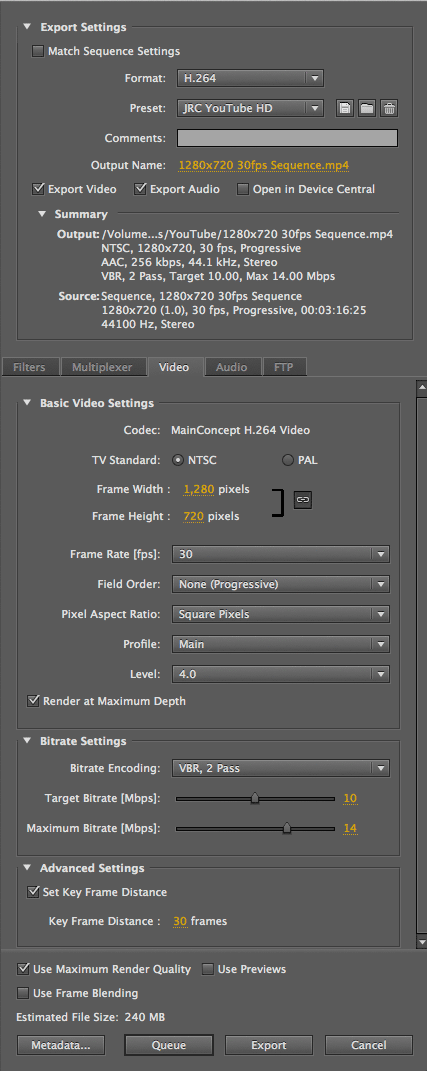
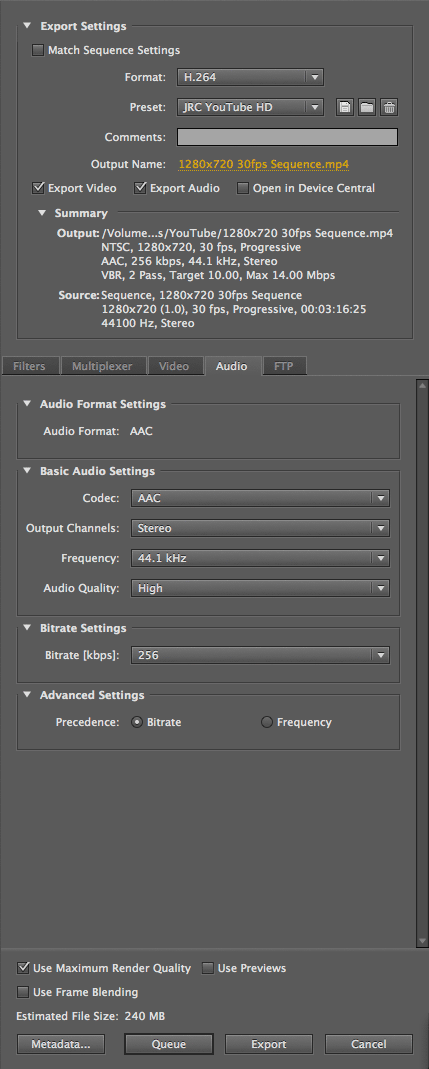
Once the video is comped together in Premiere it has to be exported at high-quality for uploaded to YouTube. I got and tweaked ‘export media’ settings from a YouTube tutorial and they might be slightly overkill quality-wise but I’ve added screenshots on the right…

4. Sit Back And Watch The Traffic Roll In

Or maybe not. But here’s the finished product anyway…

premiere_vid_youtube
Adobe Premiere YouTube Video Export Media Settings.

premiere_audio_youtube
Adobe Premiere YouTube Audio Export Media Settings.

Floppy Frog – Don’t Flap, Hop!

Recently it has become abundantly clear that the JavaME platform, from which I’ve been deriving a living for more than ten years, is no longer going to be viable platform for a mobile gaming company to support, let alone rely on for a main income stream.

In Spring this year I decided to take the plunge and port all of my library code to Xamarin/Monogame so that, going forward, I can (in theory) develop across the Android, iOS and WinPho platforms with pretty much a single codebase.

There were a number of reasons for choosing Xamarin over other cross-platform solutions such as Marmalade, but the key one was the ability to code in C# which would make the porting of my extremely large (you may read ‘bloated’) existing codebase significantly easier.

I can’t say the process has been easy – there has been much weeping and gnashing of teeth, but overall I am pleased with the Xamarin/Monogame solution. The ‘single codebase’ promise is working out in practice and I find C# a great language to work with.

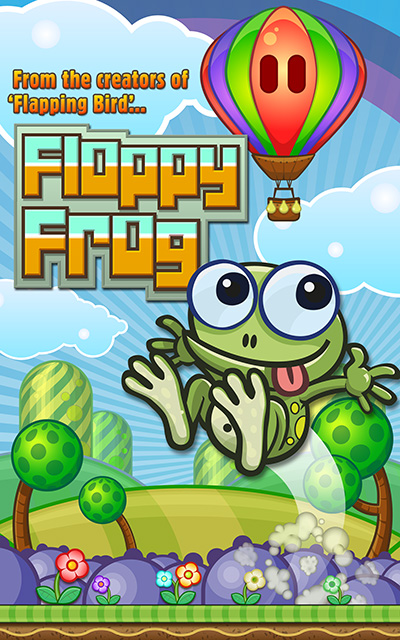
My first game built ‘from the ground up’ for Monogame has just been released on the App Store and Google Play. Floppy Frog is a deliberately challenging endless jumpy platformer inspired by the likes of Frogger, Flappy Bird, Doodle Jump and Paper Toss, though without being a ‘clone’ of any of these. It’s available for free, currently monetized with AdMob ads. The game is very simple but I’m very pleased with it.

Give it a go – download for iOS or Android. Any positive reviews/ratings are of course much appreciated!

Hello, World!

Well, it would seem to be the most obvious first post from a developer and it’s probably taken me longer to get this damn WordPress CSS customised and looking vaguely presentable than any other ‘Hello, World!’ I’ve attempted over the years.

And given the last dying gasps of JavaME / J2ME in mobile phone gaming I guess it’s less:

System.out.println( “Hello, World!” );

…and more:

Console.Out.WriteLine( “Hello, World!” );

But more on that later. Maybe…